
eBay
Ce contenu n’est pas encore disponible dans votre langue.
Connect eBay to save your eBay Partner Network IDs. Feedigy adds them to the listing links in your eBay feeds, so the sales pay commission to you. You do not need to connect eBay to build eBay feeds.
Get your eBay IDs
Section titled “Get your eBay IDs”Campaign ID
- Sign in to the eBay Partner Network. Not a member yet? Sign up and wait for eBay to approve your account.
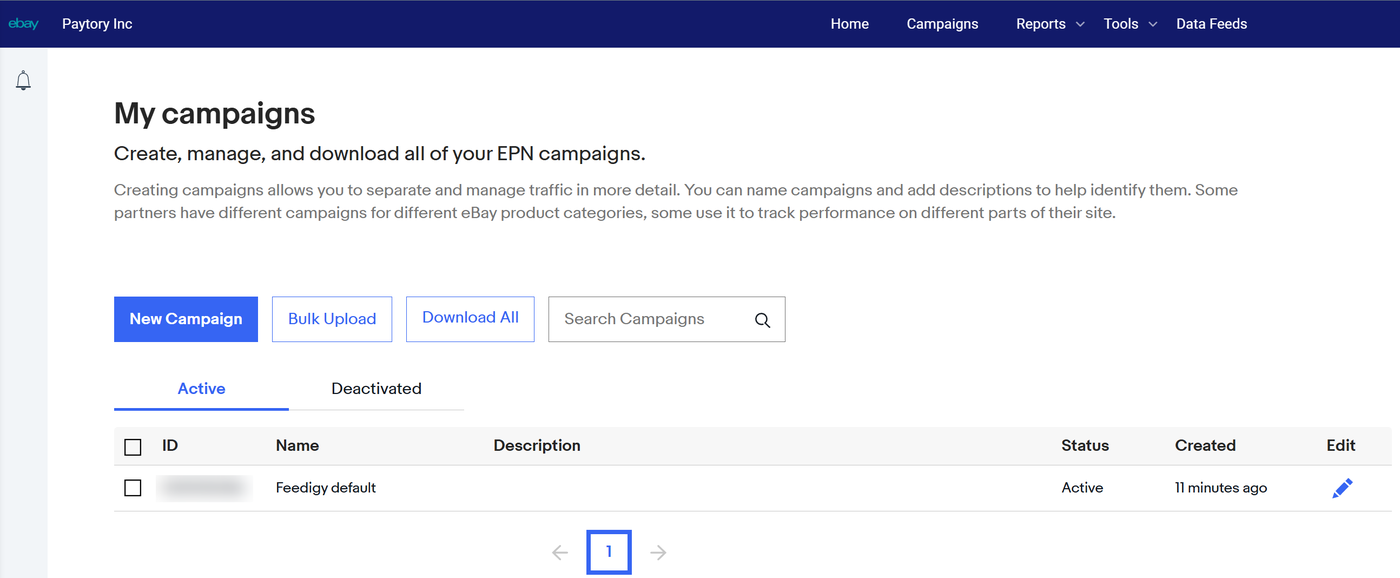
- In the top menu, select Campaigns.
- Under My campaigns, find your campaign. The Campaign ID is the number in the ID column. To add another campaign, select New Campaign.
Custom ID (optional)
The Custom ID is a label you choose. EPN does not generate it. Type any short text, up to 200 characters, for example feedigy-news. EPN adds it to your reports, so you can see which feeds earn. Leave it empty if you do not need it.
Connect
Section titled “Connect”- In EPN, get your Campaign ID and, if you want one, a Custom ID. See Get your eBay IDs.
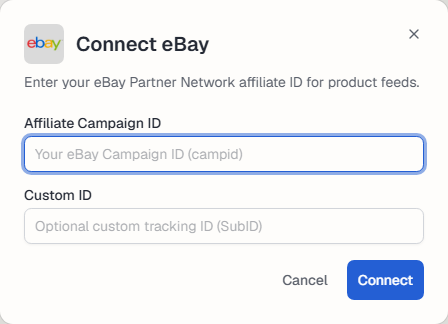
- In Feedigy, open Channels, select Add a channel, then the eBay card.
- Enter the Affiliate Campaign ID and, optionally, a Custom ID to tell your feeds apart in eBay’s reports. Select Connect.
Manage the connection
Section titled “Manage the connection”The channel appears on the Channels page. Use Settings to rename it, change its picture or Reauthorize it, and Disconnect to remove it. See What are channels?.
Keep posting through busy weeks
Set sources, keywords and posting hours once. Feedigy posts to your channels while you work on other things.
No card required. The Free plan has no time limit.