
























If you republish or curate articles on a WordPress site, every post needs six decisions: how much text to copy, whether the page gets indexed, which canonical it carries, how you credit the source, what you add and where you link. Get those right and content syndication won't hurt your rankings or the original author's. Most of the work is two fields in Yoast SEO or Rank Math and one line of text.
This is the hands-on WordPress version. For the theory of how Google picks one version among several copies, read our guide to content syndication and duplicate content.
Should you copy the full post, an excerpt or just a link?
Decide this first. It settles most of the other choices.
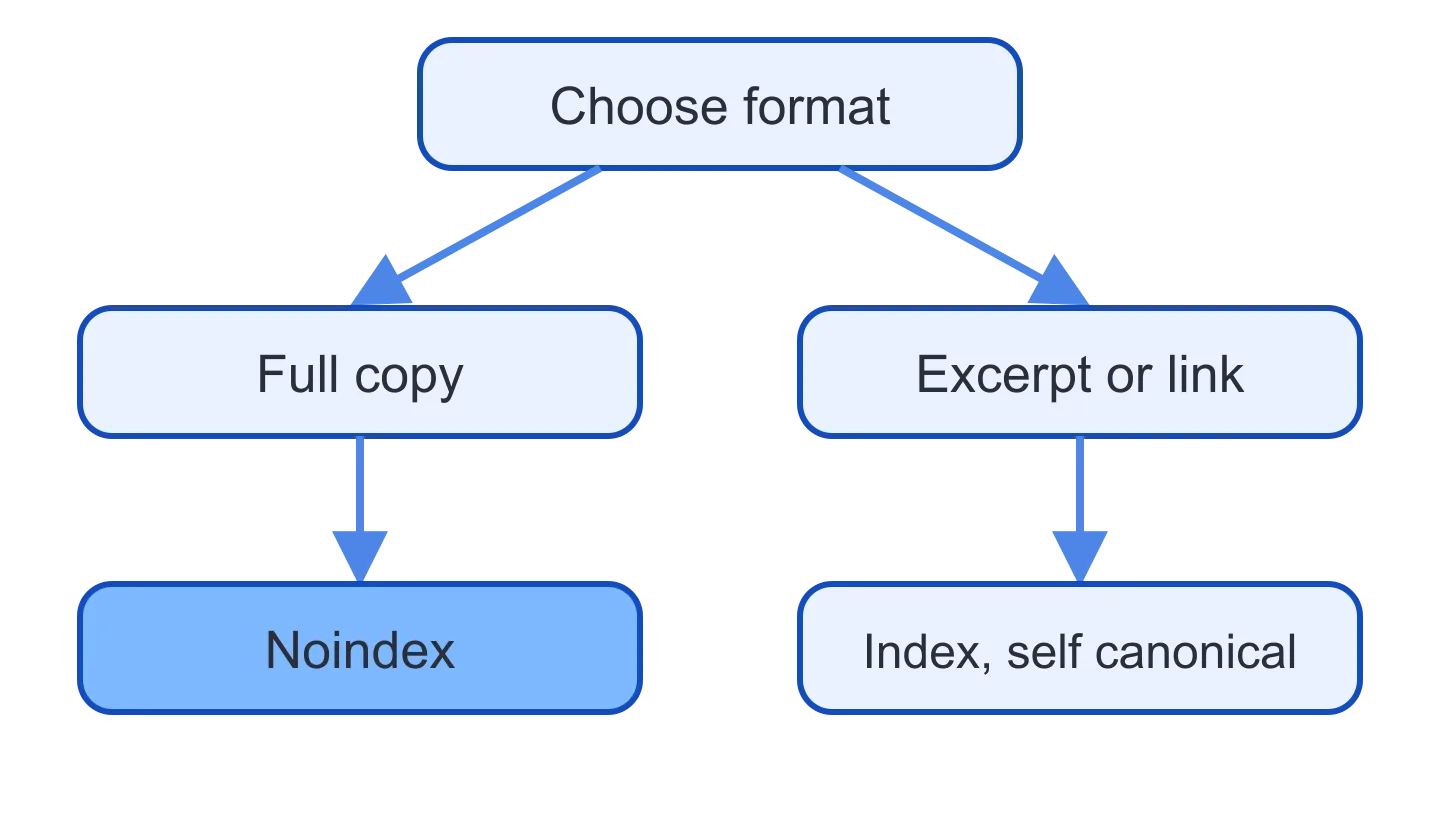
- Full copy. You republish the whole article, with the author's permission. The page competes head to head with the original, so it should be noindexed.
- Excerpt. You quote the opening, add your own take and send readers to the source. That page is a new piece and can be indexed.
- Link only. A headline, a sentence or two of your own and a link. Index it.
Curation sites mostly live in the middle. WordPress already has an Excerpt field for this, in the post sidebar. Leave it empty and WordPress builds one from the first 55 words of the post, which may cut off mid-thought. Write your own.
A full copy is a rights question before it's an SEO question. Ask the author, or follow the republishing terms the source site publishes.
| Format | Index it? | Canonical |
|---|---|---|
| Full copy | No | Leave blank |
| Excerpt + commentary | Yes | Self |
| Link only | Yes | Self |
How do you noindex a syndicated post in WordPress?
For full copies, Google's position is plain. Its canonicalization docs now say "the most effective solution is for partners to block indexing of your content". Danny Sullivan of Google said publishers should "require their partner to use noindex". If you're the one republishing, you're the partner.
In Yoast SEO
Open the post, scroll to the Yoast box and open Advanced. Set "Allow search engines to show this post in search results?" to No (Yoast's noindex guide). By default only editors and admins see the Advanced tab, so an author on your team may not find it.
In Rank Math
Open the Advanced tab in the post editor and tick No Index (Rank Math's noindex guide). Tab missing? Turn on Advanced Mode under Rank Math SEO > Dashboard.
In WordPress core
With no SEO plugin, core has a helper, wp_robots_no_robots, that adds noindex to the robots meta tag. Added globally, it noindexes your whole site. Scope it instead, for example to posts in a category with the slug repost:
add_action( 'wp', function () {
  if ( ! is_single() ) {
    return;
  }
  if ( ! has_category( 'repost' ) ) {
    return;
  }
  add_filter(
    'wp_robots',
    'wp_robots_no_robots'
  );
} );
⚠️ After publishing, view the page source and look for noindex in the robots meta tag. If a plugin also writes that tag, make sure the page ends up with one clear directive.
Self-referencing or cross-domain canonical?
A canonical tag names the URL you consider the main version. Google treats it as "a hint, not a rule". You have two options on a WordPress post.
A self-referencing canonical points the page at itself. Yoast outputs one when you leave its Canonical URL field blank (Yoast's canonical guide). Use it on excerpt and link-only posts, since those are your own pages.
A cross-domain canonical points at the original article on another site. You paste the source URL into the Canonical URL field in Yoast or in Rank Math's Advanced tab.
Google's docs used to suggest cross-domain canonicals for syndication. In May 2023 Google rewrote them to say the canonical element "is not recommended for those who wish to avoid duplication by syndication partners", as Search Engine Land reported. Sullivan explained that canonical "is designed primarily to deal with near duplicate pages". So on a full copy, noindex comes first. Use a cross-domain canonical only when the source asks for it.
Why pick one and not both?
Noindex asks Google to keep the page out of search. A cross-domain canonical asks Google to fold the page into another URL. Put both on one post and you send two different instructions, and you can't tell which one Google acted on.
How do you show content provenance on the post?
Content provenance is the trail that shows where a piece came from and who wrote it. A reader should see it without hunting, and search engines read parts of it too. On a republished post, build it from four parts:
- An attribution line, such as "Originally published at [Source name]", linked to the exact article, not the homepage.
- The original author's name in the text. Your WordPress author field shows who posted it on your site, which is a different fact.
- The original publish date, when it differs from yours.
- The noindex or canonical setting from the sections above.
💡 On full copies, put the attribution line at the top. People who arrive from social see the credit before they read a single paragraph.
What counts as unique commentary?
Commentary is what makes an excerpt post worth indexing. A two-sentence summary of the source doesn't qualify, because the source already says it better.
Commentary that earns its place does at least one of these:
- Says who the piece is for and why your readers should care.
- Disagrees, or adds a caveat the author skipped.
- Applies the idea to your audience's tools, budget or team size.
- Connects it to another source that confirms or contradicts it.
A simple house rule helps: your words should outnumber the quoted words. And write the commentary before the post goes live. An excerpt waiting for "notes later" is a thin page until someone gets to it.
Where do internal links fit?
Inside your commentary, add one or two links to related posts on your own site. That gives curated traffic somewhere to go after the source link. Then link from your own articles to curated posts when they help the reader.
Use a dedicated category for republished posts, like "Curated" or "Repost". It groups them for readers and gives you a clean scope for the noindex snippet above.
If you send your own posts out
The same site often plays both roles. When partners or aggregators pull your posts, usually through your feed (here's how to find a site's RSS feed URL if you're checking what they see), a few settings protect you:
- Under Settings > Reading, switch the feed option from full text to the summary setting. Scrapers then get an excerpt.
- Ask each partner to noindex full copies.
- Leave the canonical field blank on your posts, so each one points at itself.
- Put a link to a related post of yours in the body. It travels with every full copy.
Pre-publish checklist for republished posts
- Format chosen: full copy, excerpt or link only.
- Permission on file for any full copy.
- Index setting matches the format.
- Canonical is self or blank, and never combined with noindex.
- Attribution line links to the exact source article.
- Original author and date are visible.
- Your commentary is already in the post.
- One or two internal links in your text.
- Post is in your "repost" category.
What if the copy outranks the original?
Sometimes a republished copy ranks above the source. Work through it in order.
- Confirm the noindex is live. View the source of the copy and look for
noindex. Check that no plugin overrides it. - Give it time. Google has to recrawl the page to see the new tag. Search Console's URL Inspection tool lets you request a recrawl.
- Check the attribution link. It should point at the exact article and work.
- If you're the original and a partner won't noindex, ask for a cross-domain canonical as the fallback.
📌 If someone copied your post without permission, that's a copyright matter. No SEO setting on your site fixes it.
Questions about content syndication on WordPress
Does content syndication hurt SEO on a WordPress site?
Not by itself. Google says some duplicate content is normal and isn't a spam violation. The risk is that Google picks the wrong copy to show. Noindex on full copies and visible attribution handle most of that.
Can I use a canonical tag and noindex on the same post?
Pick one per post. Noindex removes the page from search, while a cross-domain canonical asks Google to merge it with another URL. For full syndicated copies, Google now recommends noindex.
Should I noindex excerpt posts too?
Usually not. An excerpt with real commentary and a link to the source is your own page, so keep it indexed with a self canonical. Noindex it if the commentary is thin and you don't plan to add more.
How long should an excerpt be?
Long enough to show what the piece is about, short enough that readers still need the source. The opening paragraph or two is a common choice. WordPress's automatic excerpt uses the first 55 words.
Republishing to WordPress with Feedigy
Feedigy's WordPress Auto-Publisher posts feed items to your WordPress site through a WordPress Application Password. In the single-post layout, a slider sets body length from a short plain-text excerpt up to full text. An attribution line linking the original is on by default, with editable prefix text ("Originally published at" plus the source name).
Set the post status to Draft or Pending and each item waits in WordPress until you add your commentary. Map items to a target category, such as repost, so the noindex snippet above catches them.
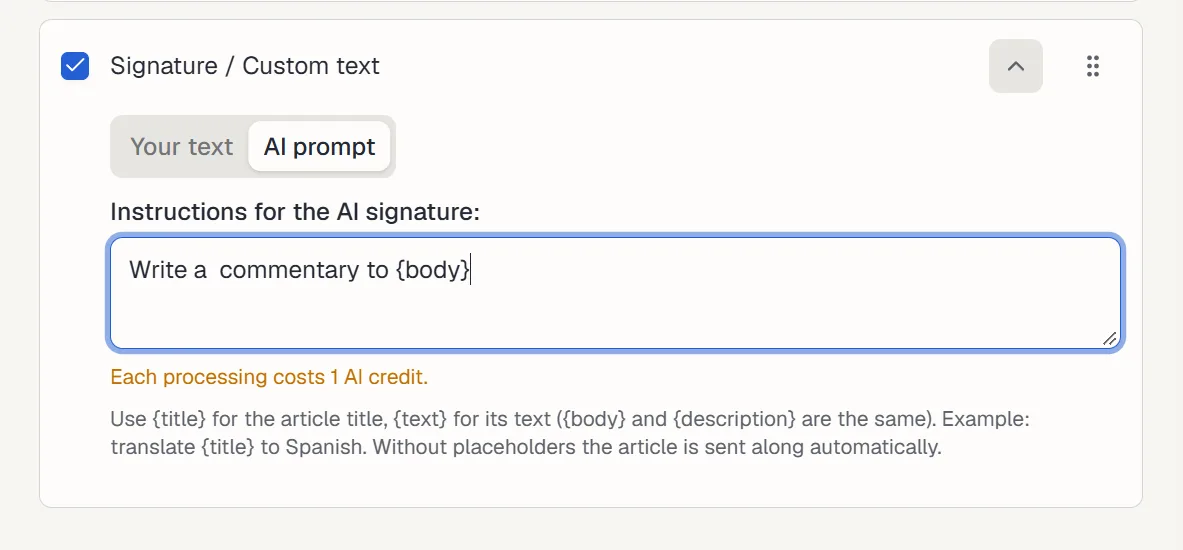
The commentary can come from the Signature element. Switch it to the AI prompt tab, write your instructions, and Feedigy generates the commentary when the post publishes (1 AI credit). Use {body} or {title} in the prompt to pass the article in.
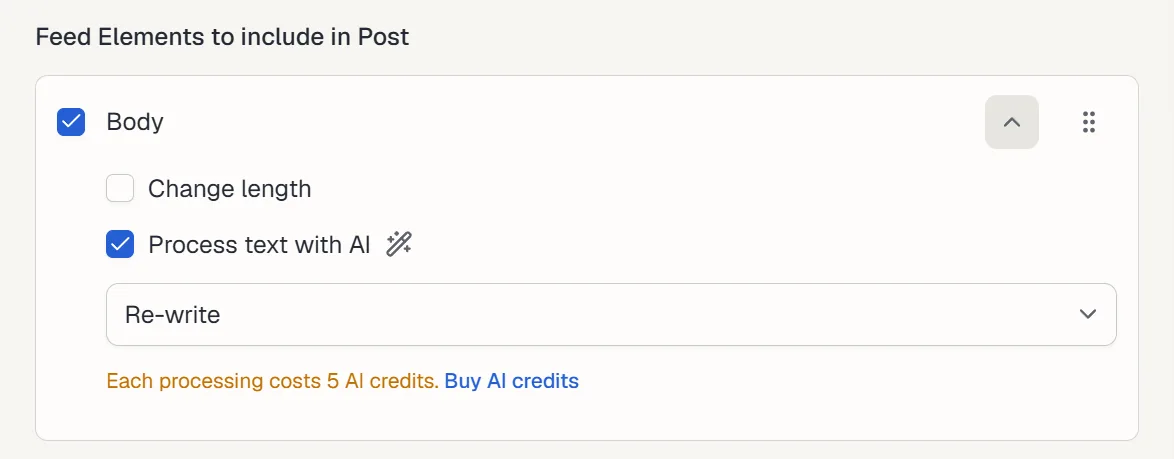
The Body element has an AI option too. Tick Process text with AI and pick Re-write, and Feedigy re-writes the text in different words. The menu also offers shorter, longer, translate, summarize and your own prompt (5 AI credits). The AI version goes to WordPress only. The stored feed item stays unchanged.
A rewrite is still the source's idea, so keep the attribution line on and add your own take. Pair AI with Draft or Pending status so you can edit before anything goes live. Feedigy doesn't add canonical or noindex tags, so set those in Yoast, Rank Math or core.
Create a Feedigy account to set up content syndication to WordPress with excerpts and attribution in place.