

























You can now post any item from a feed preview straight to Facebook, X, LinkedIn, Instagram and Telegram, with its text, images and tags already in the composer. Deletes come with a 6-second Undo, the calendar's Day view stacks posts that sit close together, and Feedigy-hosted feed links open as a readable page in a browser. These Feedigy product updates shipped between November 1 and 9, 2026 (versions 0.9.42 and 0.9.43), and every one of them is live now.
If you collect content from RSS feeds and share it on social channels, most of this release is for you.
How do you post to social media from an RSS feed now?
Sharing a feed item already started a channel post, but only part of the work came with it.
❌ Before: the composer filled in the title, the link and one image. You added the body text and the tags yourself.
✅ Now: open the post's ⋮ menu in any feed preview and select Post to channels. The text, up to 10 images and up to 20 tags come along too, and it works on live preview entries as well as stored ones.
Feedigy imports the images into your media library as the composer opens. If an image can't be imported, Feedigy skips it and shows a notice, so you know what's missing before you publish. An item with no title, text or link starts as "Untitled".
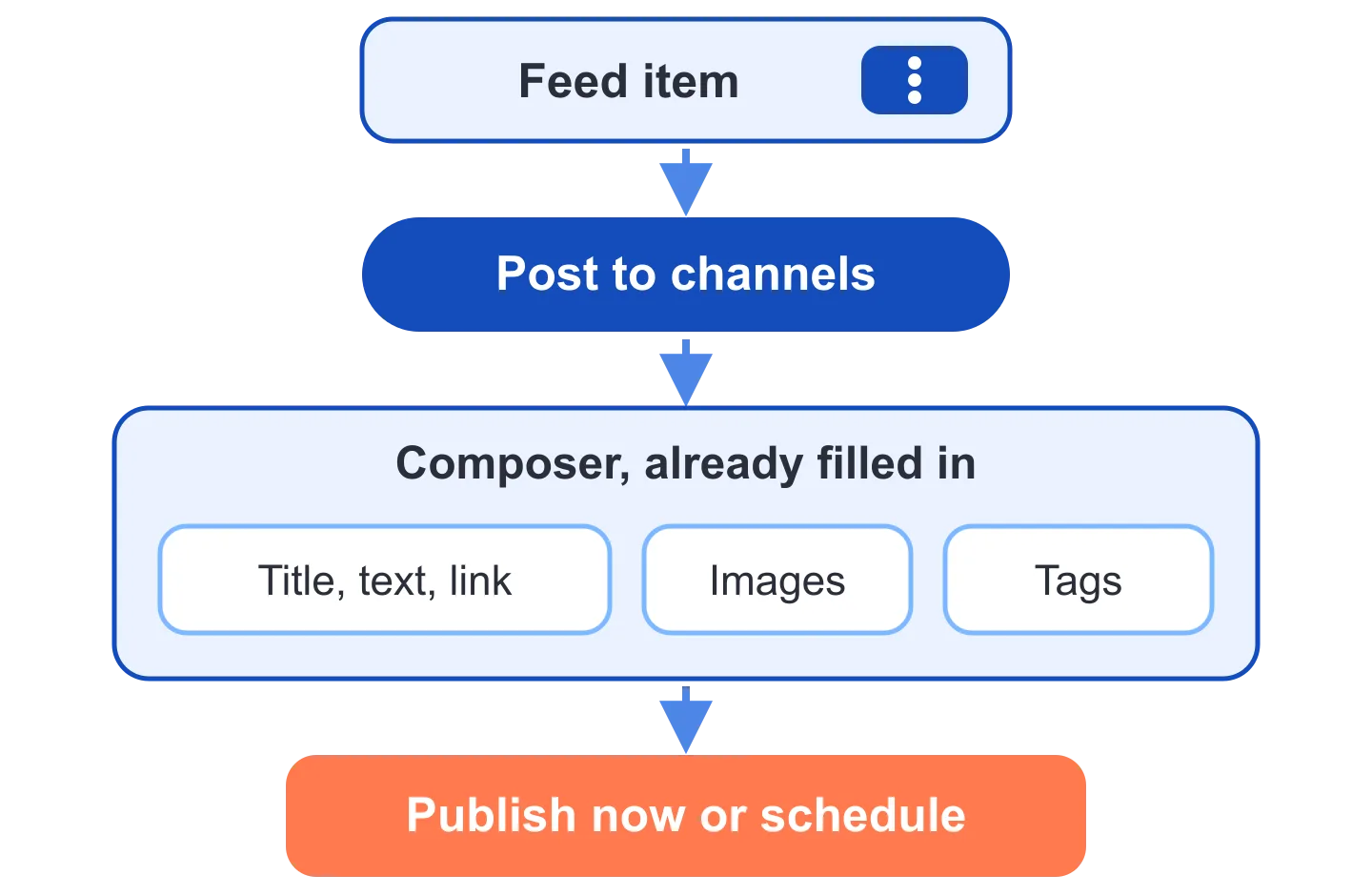
Pick one or more channels in the composer. Channel posts go to Facebook, X, LinkedIn, Instagram and Telegram, either right away or on a schedule. The channel posts docs walk through each step.
Each channel can also have its own text. Say a café's blog feed publishes "New autumn menu is live!" You can send that line to three channels at once, then shorten the X version and add a longer note on Facebook, all in the same composer.
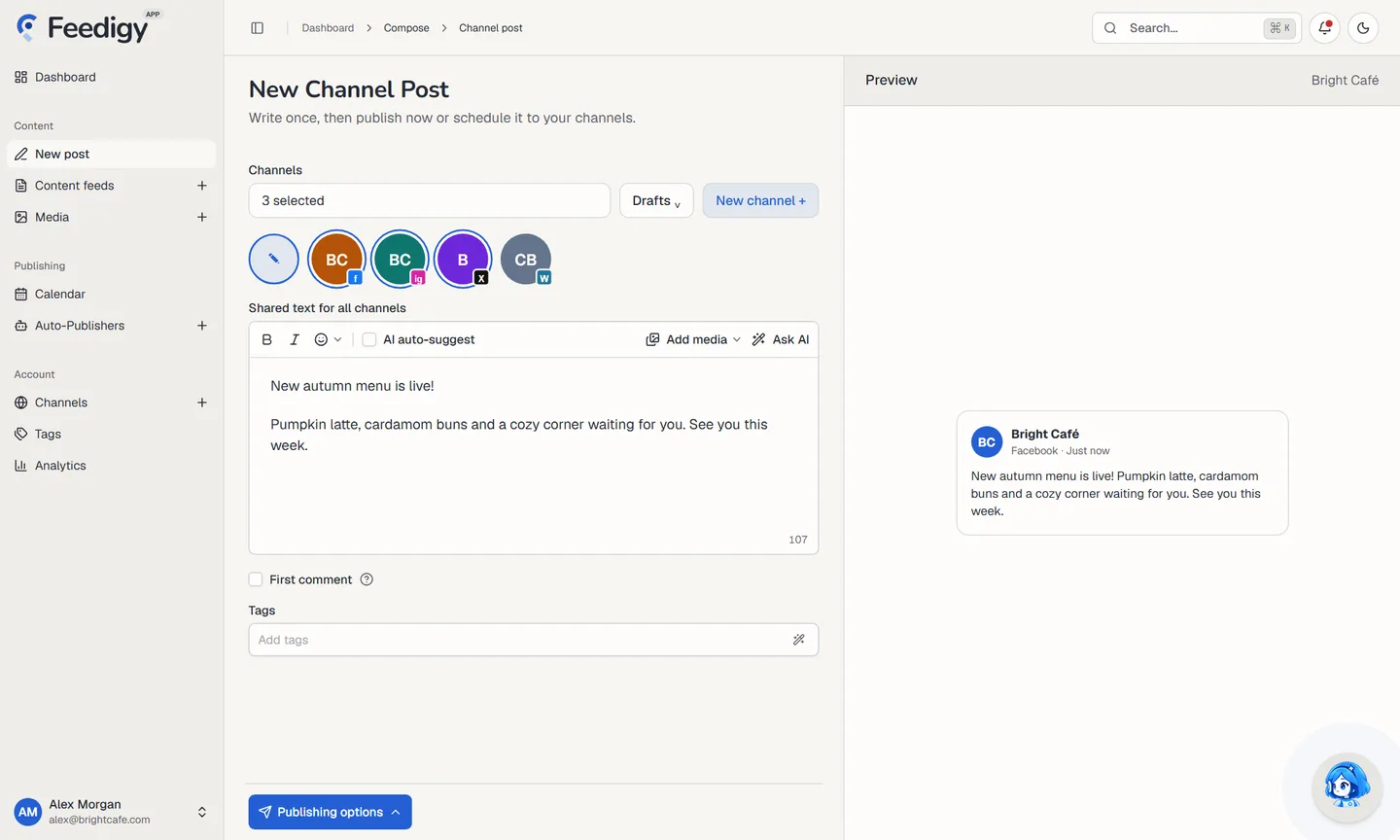
Publish, then start the next post
When you choose Publish Now, the status dialog stays open and shows each channel's progress. It also has two new buttons. Open Calendar takes you to your schedule. New post opens an empty composer, which helps when you're working through a batch.
The channel post layout now works on phones, and sheets close with a swipe on mobile.
The editor has the prompt library and one AI menu. That menu holds Rewrite, Improve, Emojify, Make longer, Make shorter, Fix spelling, Simplify, Continue and Summary. Use Make shorter when the X version runs long, or Emojify when a Telegram post feels flat.
New to channel posts? A guided tour called "Compose a channel post" walks you through it in 9 steps. Start it from the Getting started page.
Undo a delete you didn't mean
Most of us have deleted the wrong feed at least once, usually the one right next to the feed we meant.
Deleting content feeds, media or Auto-Publishers still asks you to confirm. After you confirm, the items disappear and a message offers Undo for 6 seconds. A bar drains to show the time left. Hover over the message and the timer pauses, which gives you a moment to think. Click Undo and the items come back. Nothing is deleted.

If you let the 6 seconds run out, the delete goes through.
See crowded time slots in the calendar's Day view
When several posts are scheduled close together, they now fold into a stack with a count badge. Click the stack to expand it and see each post.
Cards for posts that are sending right now shimmer, so you can tell at a glance what's going out. The calendar docs cover the other views.
Why does my feed link look different in a browser?
Original and smart feeds that Feedigy hosts have a link ending in ?format=xml. Until now, that link relied on XSLT, a browser feature Chrome is removing, so opening it showed a warning banner, and soon it would have shown raw XML.
Now the same link opens a friendly page in a browser. Feed readers still get RSS from that exact URL, so nobody has to resubscribe. If you share your feed link with a client or a teammate, they'll see something readable when they click it.
Smaller improvements in these Feedigy product updates
- Blogger Auto-Publishers get a body length slider, custom link anchor text, a signature above or below a digest, and an items-per-post range slider. Post status and layout moved into Advanced mode.
- In Telegram Auto-Publishers, tick Don't let long posts get cut off to send the rest of a photo post after its 1,024-character caption as replies of up to 4,096 characters. The preview labels each part.
- New interval Auto-Publishers vary posting times by 4% by default, so posts look less robotic. Custom day and time schedules keep their exact times.
- AI Studio adds GPT Image 2.6 Flare and Sunburst, with quality and output format settings including GIF generation, and GPT Image 2.6 Economy for PNG images with aspect ratio and background settings.
- Febe, the AI assistant, can delete all past conversations at once, and its quick prompts now run real actions.
- Usage meters on the dashboard and Billing animate, and filter buttons show their label on hover.
- The Channels tour was reworked and now has 8 steps.
- A 100%-off coupon skips the payment details step at checkout.
- The blog RSS feed shows the latest 50 posts, with images.
Questions about this Feedigy update
Do my subscribers need a new feed URL?
No. The ?format=xml link of a Feedigy-hosted feed stays the same. Browsers show a readable page, and feed readers keep getting RSS from that URL.
Which channels can I post a feed item to?
Facebook, X, LinkedIn, Instagram and Telegram. You can publish now or schedule the post, and each channel can have its own text.
What happens if an image from the feed can't be imported?
Feedigy skips that image and shows a notice, so you see the gap before you publish.
How long do I have to undo a delete?
6 seconds after you confirm. Hovering over the message pauses the timer.
Try Post to channels
Want to try Post to channels on your own feeds? Create a Feedigy account. For the full list of Feedigy product updates, see the changelog.