
Best Buy feeds
A Best Buy feed is a smart feed of products from Best Buy that match your keywords. Each product becomes a feed item with its image, name, price and a link to Best Buy. Use it for tech deals, gift guides or product news.
Create a Best Buy feed
Section titled “Create a Best Buy feed”- Open Content feeds in the sidebar, then Generate smart feed.
- In Select a source channel, choose Best Buy.
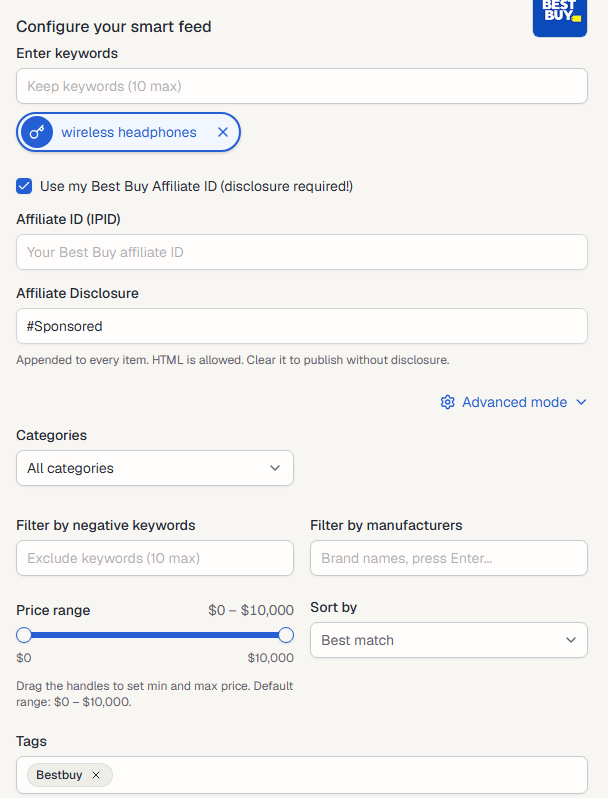
- Type a keyword into Enter keywords and press Enter. Add up to 10. Each keyword becomes its own feed. Select a keyword to preview it.
- To earn commission on sales, tick Use my Best Buy Affiliate ID (see below).
- Check the products in Live preview on the right.
- Select Generate.
Use your own affiliate ID
Section titled “Use your own affiliate ID”Tick Use my Best Buy Affiliate ID (disclosure required!) to put your own affiliate ID in every product link.
- Affiliate ID (IPID): your Best Buy affiliate ID. You can also save it once on the Best Buy channel page.
- Affiliate Disclosure: text added to every item,
#Sponsoredby default. HTML is allowed. Affiliate rules require a disclosure, so clear it only if you add one another way.
Advanced mode
Section titled “Advanced mode”- Categories: search within one Best Buy category, or All categories.
- Filter by negative keywords: skip products that contain any of these words (up to 10).
- Filter by manufacturers: only products from these brands. Type a brand and press Enter.
- Price range: drag the handles to set the lowest and highest price. The default is $0 to $10,000.
- Sort by: Best match, Bestselling, Price: low to high, Price: high to low or Customer rating.
- Tags: tags for the new feeds. Bestbuy is added for you. See Tags.
After you generate
Section titled “After you generate”The new feeds appear on the Content Feeds page with the Smart type. Feedigy refreshes a Best Buy feed at most every 2 hours, when the feed is read. To share the products on your channels, add the feed to an Auto-Publisher.
Keep posting through busy weeks
Set sources, keywords and posting hours once. Feedigy posts to your channels while you work on other things.
No card required. The Free plan has no time limit.